GuidesLast updated 2 November 20267 min read
The best daily planner apps in 2026, compared honestly
The best daily planner app is the one that matches how you plan. If you want the day laid out as time blocks, pick Superhive (which also ties each task to a goal) or Structured; for a guided ritual that pulls in your work tools, Sunsama; to have AI build the schedule, Motion; for long task lists, Todoist or TickTick. Notion suits people who enjoy building their own system, and Google Calendar is the free baseline almost everyone already has.
How we chose, and the short version
We make Superhive, so read this knowing that. Every app here is good at something, and for some readers one of the others is a better choice than ours. We judged each on four questions:
- Does it decide the day, or only store tasks? A planner should say what happens today and when.
- Does it work on the phone you carry? Most planning happens away from a desk.
- How long does a plan take? A good planner gets you to a planned day in about 10 minutes.
- What does it cost over a year? Monthly prices hide what a subscription adds up to.
| App | Best for | Free plan | Paid |
|---|---|---|---|
| Superhive | Tasks tied to goals, planned as blocks | Yes | $8.99 a year |
| Structured | A visual timeline of the day | Yes, the core | Subscription or lifetime |
| Sunsama | Guided planning across work tools | No, 14-day trial | About $16 to $25 a month |
| Motion | AI that builds the schedule, teams | No | About $19 to $29 a month, yearly |
| Todoist | Fast capture, long task lists | Yes | About $60 a year |
| TickTick | Tasks, habits and a timer in one | Yes | About $50 a year |
| Notion | Building your own system | Yes, for individuals | About $10 to $12 a month |
| Google Calendar | Events and shared calendars | Yes | Free |
Prices change and vary by country, so check them before you commit.
Superhive: tasks tied to goals, laid on the day as blocks
Superhive is a daily planner for iPhone, Android and the web. Every task can belong to a goal, and tasks with a length land on the day view as blocks in the free time around your events, so you see at a glance whether the day fits. Quick add reads the date, time, priority and goal out of a plain sentence such as "call the accountant friday 10am", and a daily shutdown closes the day: what got done, what rolls to tomorrow.
- Best for: people who want the day planned in blocks and want those blocks to add up to something, such as a degree, a launch or a training plan.
- Standout: goals with milestones and a pace sit above the daily plan, and a weekly momentum score compares you only with your own past weeks.
- Drawback: it is a younger app with fewer integrations. There is no email inbox, no team project management and no native desktop app (the web app runs in any browser), and Google Calendar import is a Pro feature. Teams and people whose work lives in Asana or Jira are better served by Motion or Sunsama.
- Price: free plan with no ads. Pro is $8.99 a year, $2.99 a month or $24.99 once.
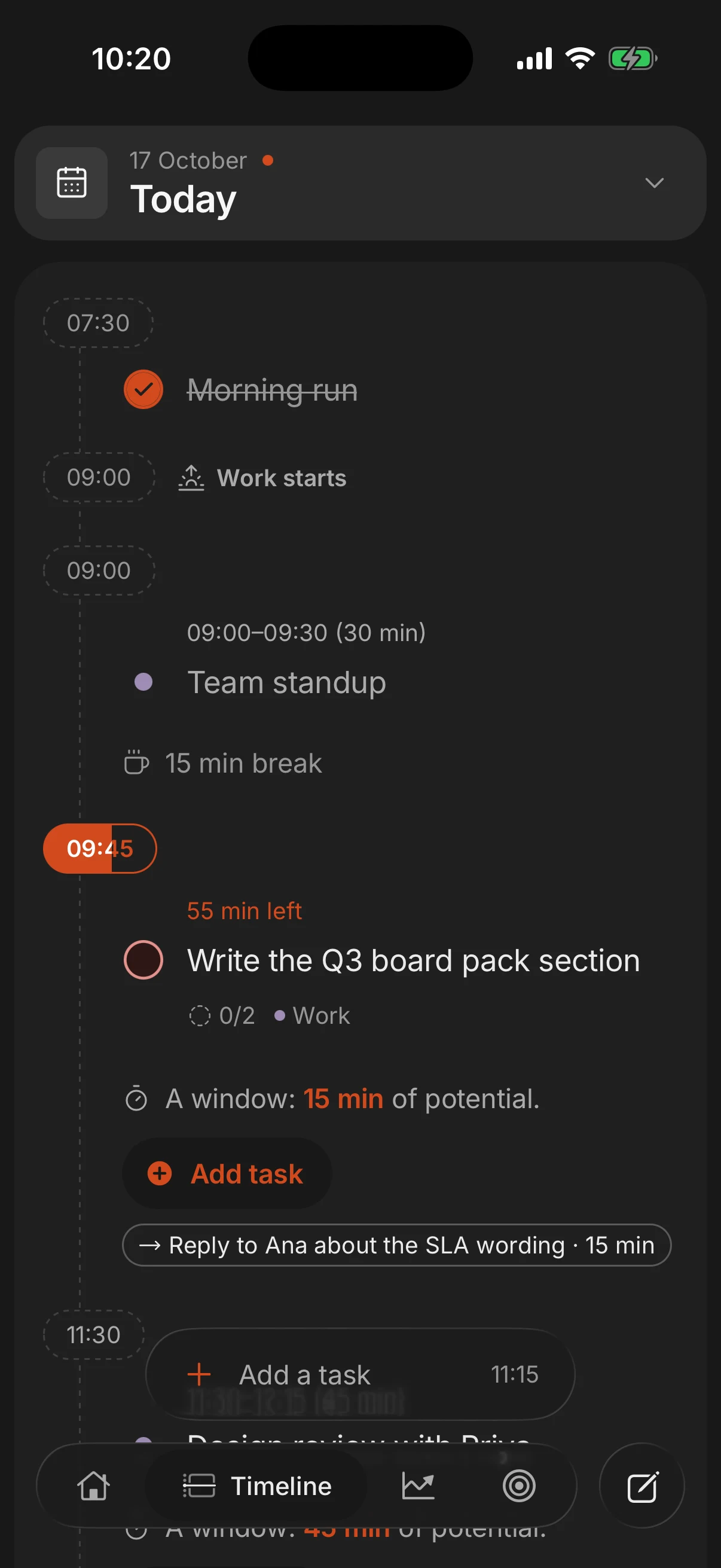
A year of Pro costs less than one month of Sunsama or Motion, and the free plan already covers the whole daily loop: tasks, goals, the day view and the shutdown.
Structured: the most visual timeline
Structured shows the day as one vertical timeline, each task a colored block. It started on iPhone and now has Android and web versions, and an AI helper turns a typed thought into tasks. Our page on Structured alternatives goes deeper.
- Best for: iPhone users who think visually and want a simple, good-looking picture of today.
- Standout: the timeline itself. Few apps make a day this easy to read.
- Drawback: tasks are not tied to long-term goals, and the Android version has fewer features than iOS.
- Price: the core is free; Pro is a subscription or a one-time lifetime purchase, with prices that vary a lot by region.
Sunsama: a guided ritual for busy work weeks
Sunsama walks you through planning every morning. It pulls tasks from the tools you already use (Asana, Trello, Notion, Jira, Gmail and others), asks what fits today and has you timebox each one on the calendar. In the evening a guided shutdown reviews the day.
- Best for: knowledge workers juggling several work tools who plan at a desk and will pay for the ritual.
- Standout: integrations. Work from many apps lands in one daily plan.
- Drawback: roughly $190 to $300 a year with no free plan, and the experience is built around the desktop more than the phone.
- Price: subscription only, about $16 to $25 a month depending on plan and billing, after a 14-day trial. More in our Sunsama alternatives guide.
Motion: when you want AI to build the schedule
Motion takes your tasks, deadlines and meetings and schedules the work for you, moving things when the day changes. It also handles team projects, so a manager can see who is doing what and when.
- Best for: people who would rather not decide their own schedule, and teams that want planning and project management in one tool.
- Standout: auto-scheduling. Add a task with a deadline and it finds the time.
- Drawback: the price, and the loss of control. When an algorithm reshuffles the day, the plan can feel like someone else's, and for one person much of the tool goes unused.
- Price: about $19 to $29 a month for individuals billed yearly, more month to month. See Motion alternatives.
Todoist and TickTick: list-first task managers
Both are task managers first and planners second. They are excellent at holding everything you have to do, and both can show tasks on a calendar, but the heart of each is a list, not a day of blocks.
Todoist has some of the best natural-language input around (type "pay rent every month on the 1st" and it understands), plus projects, labels, filters and integrations on every platform. It is best for people with long lists who want capture to be instant. The catch is that it is list-first: a calendar view exists, but planning hours is not what it is built for. Free plan; Pro about $5 a month billed yearly. See Todoist alternatives.
TickTick puts tasks, a calendar view, a habit tracker and a Pomodoro timer in one app. It is best for people who want one tool for everything and do not mind a busy screen. The catch is that density: with this many features, it can feel crowded. Free plan; Premium about $50 a year. See TickTick alternatives.
Notion and Google Calendar: the build-it-yourself route
Notion is a flexible workspace of pages and databases. With a template you can build a daily planner that looks exactly how you want, and it is free for individuals (Plus is about $10 to $12 a month per member). The catch is that it is a blank canvas: there is no native flow for planning a day in blocks on the phone, and reminders and quick capture are slower than in a dedicated planner. Our guide to Notion as a planner shows what works.
Google Calendar is free, already holds your meetings and is the best tool here for shared calendars and events. The catch is tasks: Google Tasks is basic and sits apart from your blocks, so most people copy tasks over by hand. Time blocking in Google Calendar explains how to make it work.
Which one should you pick
- You want to see the day as blocks on your phone: Superhive, or Structured if you are on iPhone and do not need goals.
- Your tasks live in Asana, Jira or Gmail and you plan at a desk: Sunsama.
- You want the computer to decide when you work, or you run a team: Motion.
- You have hundreds of tasks and plan loosely: Todoist, or TickTick if you also want habits and a timer.
- You love building systems and already live in Notion: Notion.
- Your day is mostly meetings, not tasks: Google Calendar.
Give any planner one full week before you judge it. The app matters less than the habit: 10 minutes each morning to place the day, 5 each evening to close it.
The method is the same in any app; how to plan your day walks through it.
Questions people ask
What is the best free daily planner app?
For a timeline of the day, the free plans of Superhive and Structured cover the basics. For lists, Todoist and TickTick have generous free plans, and Google Calendar is free for events.
What is the best planner app for iPhone?
If you want to see your day as blocks, Structured and Superhive are both built around a timeline, and Superhive adds goals above the tasks. If you prefer lists, Todoist and TickTick are strong on iPhone.
Which planner apps sync with Google Calendar?
Sunsama, Motion and Todoist connect to Google Calendar, and Superhive imports it on Pro and can write scheduled tasks back as blocks. Check the details for the app you pick.
What is the best planner app for ADHD?
Look for a visible timeline, alerts when blocks start and almost no setup. Visual planners tend to suit this better than long lists; our guide to planning with ADHD covers what helps.
Is Notion good as a daily planner?
It can be, if you enjoy building and maintaining your own setup. For quick planning on the phone a dedicated planner is faster; see using Notion as a planner.
Keep reading
- A cheaper Sunsama alternative that keeps the daily ritualSunsama costs about $16 to $25 a month with no free plan. What it does well, why people switch, and alternatives that keep the daily ritual for far less.
- A Motion app alternative for people who want to decide their own dayMotion auto-schedules your day for about $19 to $29 a month. Why people leave, an alternative that keeps you in charge for $8.99 a year, and when to stay.
- Structured app alternative: Superhive vs Structured, compared honestlyLooking for a Structured app alternative? What Structured does best, why people switch, and how Superhive compares on goals, Android, web and price.
- Todoist alternatives: who should switch, and to whatTodoist is great for lists. If you want time blocks, goals or a lower price, here is how Superhive, TickTick and Things 3 compare, and who should stay.