GuidesLast updated 2 November 20266 min read
A cheaper Sunsama alternative that keeps the daily ritual
A good Sunsama alternative keeps its two habits, planning the day each morning and closing it each evening, without paying for work-tool integrations you may not need. Superhive does that on iPhone, Android and the web for $8.99 a year, against roughly $190 to $300 a year for Sunsama. Stay with Sunsama if your work lives in Asana, Jira or Gmail and you plan at a desk; there it is still the better tool.
What Sunsama does well
Sunsama earned its fans by turning planning into a ritual instead of a chore. Each morning it walks you through the day: it pulls in tasks from the tools you already use (Asana, Trello, Notion, Jira, Gmail and others), asks what realistically fits, and has you timebox each task on your calendar. Each evening a guided shutdown reviews what got done and what moves.
- The guided flow. You never face a blank page. The app asks the questions a good assistant would ask.
- Integrations. If your work is spread across five tools, seeing it in one daily list is worth a lot.
- Honesty about capacity. Timeboxing every task on the calendar shows an overbooked day before it starts, not at 5 p.m.
- The shutdown. Ending the day on purpose is one of the most underrated planning habits, and Sunsama builds it in.
Why people look for an alternative
The reasons people give for looking elsewhere rarely have to do with the method. They are usually one of these three:
- The price. Sunsama is subscription only, roughly $16 to $25 a month depending on plan and billing. That is about $190 to $300 a year, with no free plan once the 14-day trial ends.
- The phone comes second. The ritual is designed for a laptop. If you plan on the bus, between classes or over coffee before work, you want a tool that is just as good on the phone.
- Integrations you do not need. If your tasks are your own and your calendar is one Google account, you are paying for connections to tools you never open.
Check Sunsama's own pricing page for current numbers, since plans and regional prices change.
The part worth keeping, in any app
What makes Sunsama work is the routine, not the software, and you can keep it in almost any planner:
- Morning, about 10 minutes. Look at today's meetings first. Then pick at most 3 tasks that matter and give each a length.
- Place them. Put each task in a gap between events, the hardest one in your best hours. If they do not fit the gaps, drop one now rather than at 5 p.m.
- During the day. When something runs over, move the next block instead of abandoning the plan.
- Evening, about 5 minutes. Shut down: mark what got done, move what did not to a specific day, and glance at tomorrow once.
Our guides to planning your day and the shutdown ritual go into each step.
Superhive: the same ritual for a fraction of the price
Superhive is a daily planner built around those two moments. In the morning, tasks with a length land on the day view as blocks in the free time around your events, so you see straight away whether the day fits. In the evening, the daily shutdown shows what got done and what rolls to tomorrow. Every task can belong to a goal with milestones and a pace, so the days add up to something.
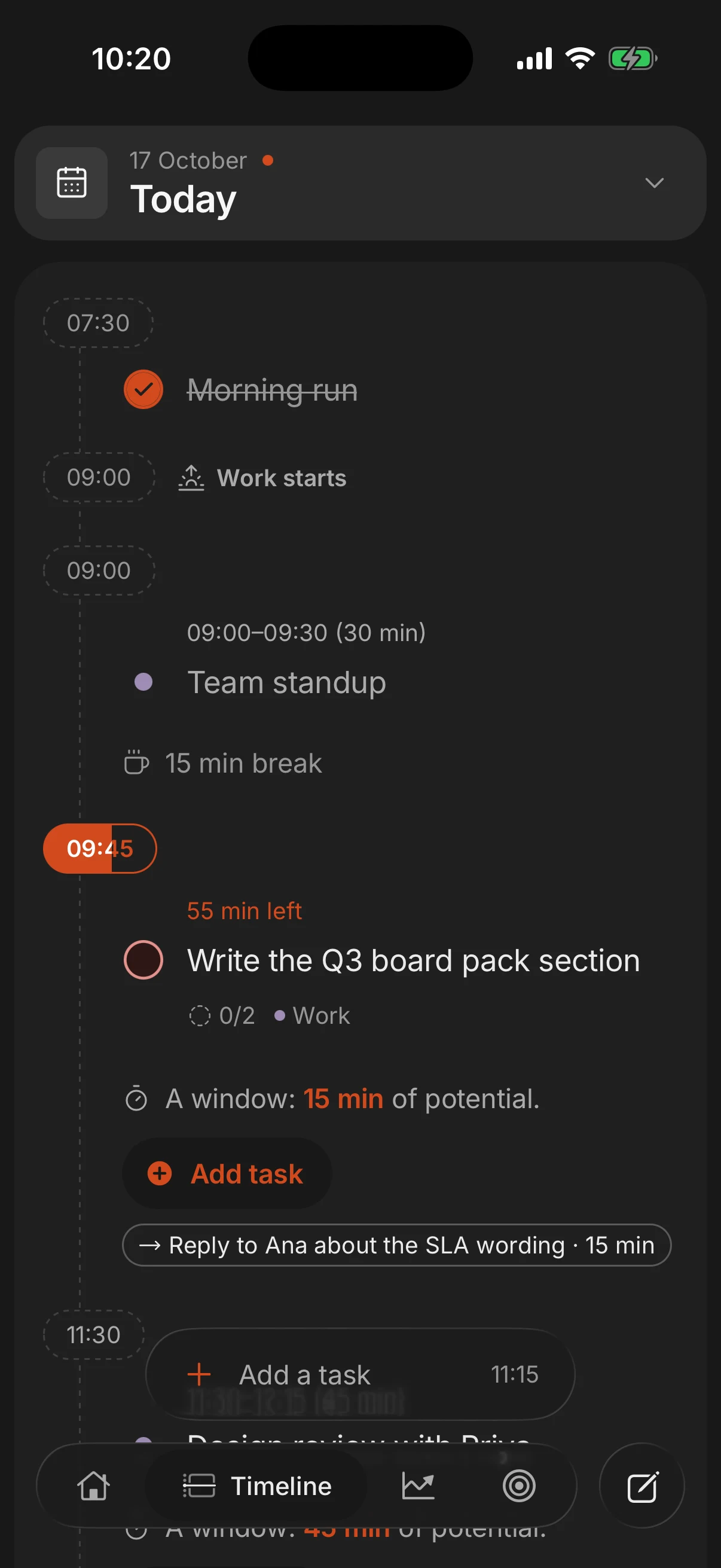
It is built for the phone first, with iPhone and Android apps and a web app for the laptop, all on one account that syncs in seconds. The free plan covers tasks, goals, the day view and the shutdown. Pro, at $8.99 a year, adds Google Calendar and phone calendar import (scheduled tasks can be written back to Google Calendar as blocks as long as the task), recurring tasks, and replan, which moves everything left undone to another day in one go. Coming from Sunsama you will want Pro, and a year of it still costs less than one month of Sunsama.
Sunsama vs Superhive at a glance
| Feature | Sunsama | Superhive |
|---|---|---|
| Price | About $16 to $25 a month | Free, or $8.99 a year for Pro |
| Free plan | No, 14-day trial | Yes, no ads |
| Morning planning | Guided, step by step | Tasks land as blocks in free time |
| Evening shutdown | Guided review | Daily shutdown, leftovers roll over |
| Integrations | Asana, Trello, Notion, Jira, Gmail and more | Google Calendar and phone calendars (Pro) |
| Built for | Desktop first | Phone first, plus web |
| Pulls tasks from Gmail | No |
Stay with Sunsama if
- Your tasks live in Asana, Jira, Trello or Gmail and you want them pulled into your day automatically. Superhive does not connect to those tools.
- You plan at a desk and like being walked through a step-by-step flow every morning.
- You want your email inbox inside your planner. Superhive has no email integration.
- Your employer pays, or the ritual is worth about $20 a month to you. If it is working, that is money well spent.
Switch for a reason you can name, such as the price or the phone, not because a new app looks fresh. In either tool, the ritual is what does the work.
Two other alternatives worth a look
Structured is the best pick if you mainly want a good-looking, visual timeline of the day on iPhone. The core is free and Pro is a subscription or a lifetime purchase. It has Android and web versions, though Android has fewer features, and it does not tie tasks to long-term goals. More in Structured alternatives.
Todoist with Google Calendar is the low-cost, build-it-yourself route: Todoist holds the list (free, or about $60 a year for Pro) and Google Calendar holds the blocks. You lose the guided ritual and do the placing yourself, but if you already use both, nothing is cheaper. Time blocking in Google Calendar shows the setup.
For the wider field, including Motion, TickTick and Notion, see the best daily planner apps.
Questions people ask
Is there a free version of Sunsama?
No. Sunsama has a 14-day free trial and then a paid subscription only. Superhive's free plan covers the day view, tasks, goals and the daily shutdown, and Pro is $8.99 a year.
How much does Sunsama cost?
Roughly $16 to $25 a month depending on the plan and whether you pay yearly or monthly, which is about $190 to $300 a year. Check Sunsama's site for current prices in your country.
What is the cheapest alternative to Sunsama?
Superhive Pro costs $8.99 a year, less than a twentieth of what Sunsama costs per year. Google Calendar with a free task list costs nothing, but you give up the guided routine.
Does Superhive work with Google Calendar like Sunsama?
Yes, on Pro. Your Google Calendar events show on your day, and scheduled tasks can be written back to Google Calendar as blocks as long as the task. Superhive does not pull tasks from Asana, Jira or Gmail.
Is Sunsama worth the money?
For people who juggle several work tools and plan at a desk every day, it often is. If you mostly need a morning plan and an evening shutdown on your phone, you can get that for much less.
Keep reading
- The best daily planner apps in 2026, compared honestlySuperhive, Structured, Sunsama, Motion, Todoist, TickTick, Notion and Google Calendar compared: who each is for, what it does best, its catch and its price.
- Shutdown ritual: how to end the workday and stop thinking about workA shutdown ritual is a 10-minute routine that closes your workday. The steps, an example and why it helps you stop thinking about work in the evening.
- How to plan your day: a 10-minute routine, step by stepPlan your day in 10 minutes: pick 3 tasks, estimate them and give each a time around what is fixed. With an example day and what to do when the plan breaks.
- A Motion app alternative for people who want to decide their own dayMotion auto-schedules your day for about $19 to $29 a month. Why people leave, an alternative that keeps you in charge for $8.99 a year, and when to stay.