GuidesLast updated 2 November 20265 min read
A Motion app alternative for people who want to decide their own day
If Motion's price or its habit of reshuffling your day is the problem, look for a planner where you decide the plan and the app makes it easy to see and change. Superhive works that way: tasks land as blocks in your free time, and replan moves what is left to another day in one go, for $8.99 a year instead of roughly $230 to $350. If you want software to make scheduling decisions for you, or you run a team, Motion or Reclaim fit better.
What Motion does well
Motion is an AI calendar. You give it tasks with deadlines, priorities and lengths, and it fits them around your meetings, then rebuilds the schedule when something changes. On top sits team project management, with projects and assignees, so a whole team's work is scheduled the same way.
- It removes a decision. You do not choose when to work on what; the schedule appears.
- It reacts to change. When a meeting lands on a planned block, the work moves somewhere else without you dragging it.
- It handles a team. Managers see who is doing what and when, in the same tool that plans each person's day.
Why people look for an alternative
- The price. For individuals Motion costs roughly $19 to $29 a month billed yearly, more month to month. That is about $230 to $350 a year for one person.
- Loss of control. When an algorithm reshuffles the day, the plan can stop feeling like yours. A schedule you did not make can be easier to ignore, and some people end up working around it.
- Overkill for one person. Team projects and workspaces are useful for teams. If you only plan your own day, much of what you pay for goes unused.
- Upkeep. Auto-scheduling is only as good as the deadlines, priorities and estimates you feed it, and keeping those current is ongoing work.
Prices change and vary by region, so check Motion's site for current plans.
Deciding the plan yourself vs having it decided
The real choice is between two ways of planning. Auto-scheduling suits a day that is mostly a queue of deadline-driven tasks, where you do not much care when each one happens. Planning it yourself suits people who know that writing goes best at 9 a.m., that Fridays are for admin, or that a task has to happen before a call.
Deciding yourself does not mean dragging boxes for half an hour. A manual routine takes about 10 minutes:
- Put the fixed things in first: meetings, classes, appointments.
- Pick at most 3 tasks that matter today and give each a length.
- Place them in the gaps, hardest work in your best hours, and leave about 20 percent of the day empty.
- When the day breaks, replan once: move what is left to a specific later day instead of reshuffling all afternoon.
Our guide to time blocking covers the method in detail.
Superhive: you decide, the app does the busywork
Superhive takes the opposite view to Motion. You choose what goes on the day; the app makes that plan quick to build and easy to see. Tasks with a length land on the day view as blocks in the free time around your events, quick add reads the date, time, priority and goal from a plain sentence, and there is no algorithm rearranging your week. When the day goes sideways, replan (Pro) moves everything left undone to another day in one go, and the daily shutdown closes the day.
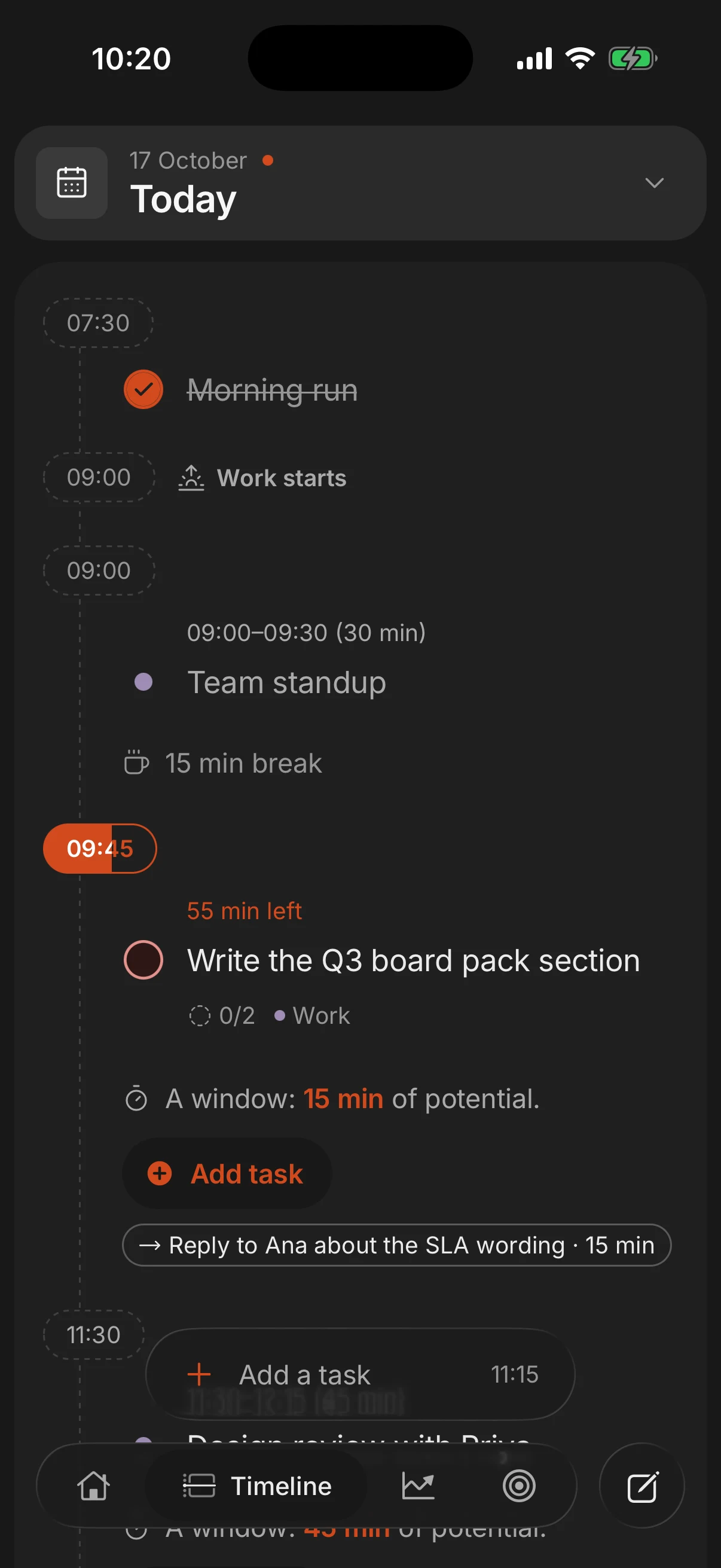
Every task can sit under a goal with milestones and a pace, and that is where Superhive differs most from a scheduler: the question is not only when a task happens but what it is for. Pro is $8.99 a year and adds Google Calendar and phone calendar import, with scheduled tasks written back to Google Calendar as blocks as long as the task. It runs on iPhone, Android and the web, and the free plan covers tasks, goals, the day view and the shutdown.
Motion vs Superhive at a glance
| Feature | Motion | Superhive |
|---|---|---|
| Who makes the schedule | The algorithm | You |
| When plans change | Reschedules automatically | Replan moves leftovers in one go (Pro) |
| Teams | Team project management | Shared goals and assigned tasks |
| Bigger picture | Projects with deadlines | Goals with milestones and a pace |
| Calendar | Built-in AI calendar | Imports Google Calendar (Pro) |
| Free plan | No | Yes |
| Price | About $19 to $29 a month, yearly | $8.99 a year |
Stay with Motion if
- You want software to decide when you work, and you are happy to follow its choices.
- Your days are full of hard deadlines and meetings that move, and re-planning by hand would eat your morning.
- You manage a team and want project management and each person's schedule in one tool. Superhive has shared goals and assigned tasks, but no team project management or Gantt charts.
- Your company pays for it. Then the price objection disappears and the only question is how you like to work.
Other Motion alternatives
Reclaim is the closest match if you like auto-scheduling but want it on top of the Google Calendar you already use. It finds time for tasks, habits and focus time and protects it as your week fills up. It has a free tier and paid plans above it; check its site for current limits.
Sunsama sits between the two philosophies: you decide the plan, but a guided ritual walks you through it each morning and pulls in tasks from tools like Asana, Jira and Gmail. It costs a little less than Motion, roughly $16 to $25 a month. Our Sunsama comparison covers the trade-offs.
For the wider field, see the best daily planner apps in 2026.
Questions people ask
Is there a free alternative to Motion?
For auto-scheduling, Reclaim has a free tier that works on Google Calendar. If you are happy to plan the day yourself, Superhive's free plan includes the day view, tasks, goals and the daily shutdown.
How much does Motion cost?
Roughly $19 to $29 a month for individuals billed yearly, and more if you pay monthly, so about $230 to $350 a year. Prices change and vary by region, so check Motion's pricing page.
Does Superhive schedule tasks automatically like Motion?
No. Superhive does not use AI to reschedule your calendar. You decide what goes on the day, tasks with a length land as blocks in your free time, and replan moves leftovers to another day when you ask it to.
Is Motion worth it for individuals?
It can be if you have many deadline-driven tasks and want to stop deciding when to do them. If you prefer choosing your own order, you pay for features you will not use.
What is the difference between Motion and Reclaim?
Both schedule for you. Motion is its own calendar and project manager for individuals and teams; Reclaim adds auto-scheduling on top of the Google Calendar you already have.
Keep reading
- The best daily planner apps in 2026, compared honestlySuperhive, Structured, Sunsama, Motion, Todoist, TickTick, Notion and Google Calendar compared: who each is for, what it does best, its catch and its price.
- A cheaper Sunsama alternative that keeps the daily ritualSunsama costs about $16 to $25 a month with no free plan. What it does well, why people switch, and alternatives that keep the daily ritual for far less.
- Time blocking: how to plan your day in blocksTime blocking gives every task a start time and a length on your calendar. How to do it in 10 minutes a day, with an example day and the mistakes to avoid.
- Time blocking in Google Calendar: a step-by-step guideHow to time block in Google Calendar: a calendar for your blocks, a color per type of work, tasks with a time, Focus time, and where it falls short.