GuidesLast updated 2 November 20266 min read
Time blocking: how to plan your day in blocks
Time blocking is planning your day by giving each task a start time and a length on the calendar, instead of keeping a list and hoping. A list says what. A block says when, and for how long. Done well it takes about 10 minutes each morning and tells you, before the day starts, whether the day actually fits.
What time blocking is
A to-do list has no clock in it. Ten tasks look the same whether they take one hour or twelve, so most lists end the day longer than they started. Time blocking fixes that by turning each task into an appointment with yourself: 9:00 to 10:30, draft the proposal. Meetings and fixed events go in first, then the work, then the gaps.
The idea is old. Cal Newport made it popular with knowledge workers in Deep Work and his time-block planner, but anyone who has ever written "gym, 7 p.m." in a diary has done a version of it. What makes it a method is doing it for the whole working day, every day, before the day starts.
Why it works
- It forces an estimate. You cannot place a task without deciding how long it takes, and that one decision catches most overloaded days before they happen.
- It makes trade-offs visible. When the afternoon is full, a new request has to replace something. On a list it just gets added to the bottom.
- It protects focused work. A two-hour block on the calendar is much harder to give away than a vague intention to "work on the report today".
- It removes the next decision. When a block ends, the next one is already chosen. You spend less of the day deciding what to do.
How to time block your day, step by step
- Put the fixed things in first: meetings, classes, the school run, lunch. Whatever is left is the time you really have.
- Pick one to three tasks that matter today, ideally ones that move a goal forward. Everything else is secondary.
- Estimate each one, then add a quarter. Almost everyone underestimates how long their own tasks take (psychologists call it the planning fallacy), so the margin is not pessimism, it is accuracy.
- Put the hardest work in your best hours. For most people that is the first half of the morning, before messages pile up.
- Batch the small stuff. Email, messages and admin get one or two blocks of 30 minutes instead of leaking into everything.
- Leave about 20 percent of the day empty. Things run over and new things arrive, and a plan with no slack breaks at the first one.
- At the end of the day, move what did not happen. Re-blocking unfinished work for tomorrow takes two minutes and is how nothing gets lost.
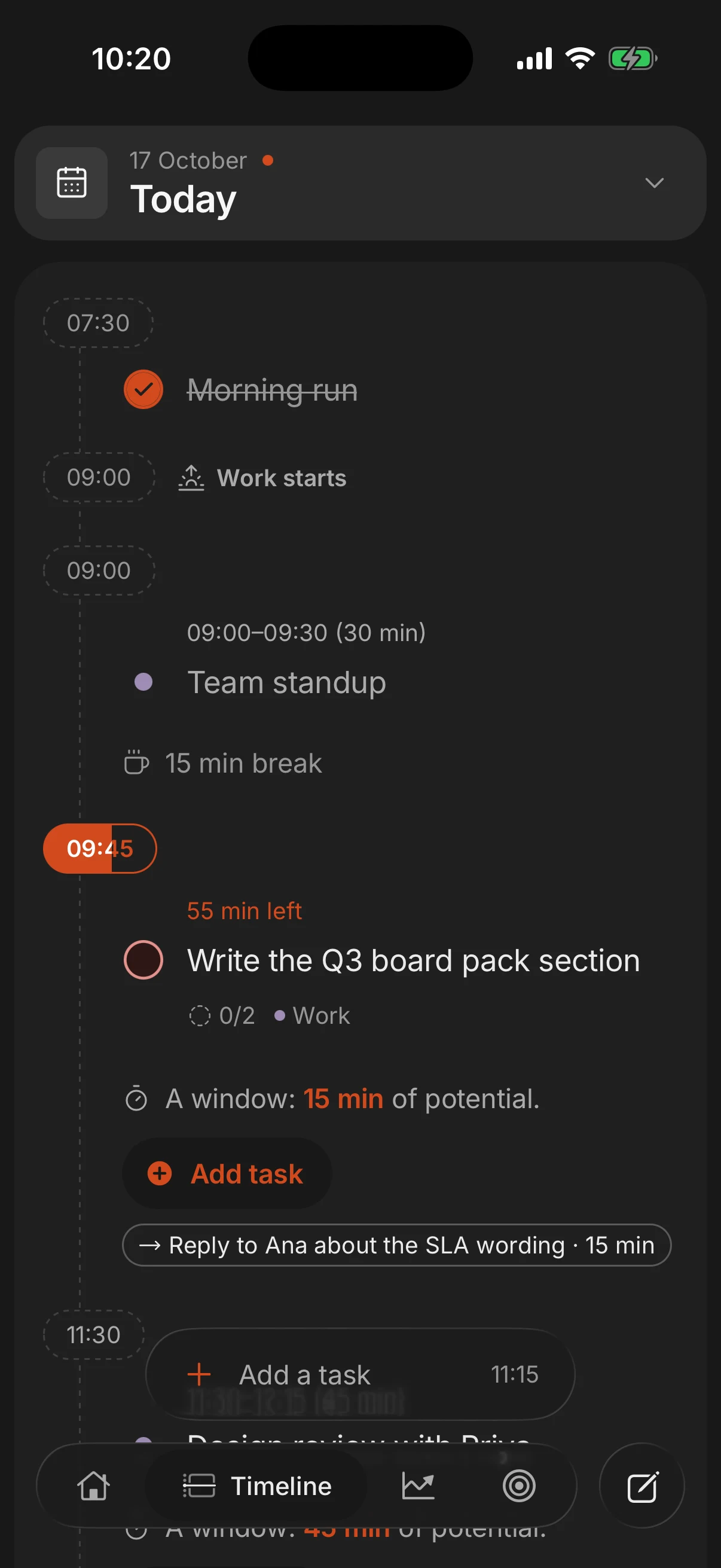
An example time-blocked day
Here is a realistic day for someone with one big piece of work, a meeting and the usual inbox. Notice that only about six hours are planned work.
| Time | Block | Why it is there |
|---|---|---|
| 8:50 to 9:00 | Plan the day | Ten minutes to place everything below |
| 9:00 to 11:00 | Write the proposal draft | The one thing that matters, in the best hours |
| 11:00 to 11:30 | Email and messages | One batch instead of all morning |
| 11:30 to 12:30 | Team meeting | Fixed, placed first |
| 12:30 to 1:30 | Lunch | A real break, on the calendar |
| 1:30 to 3:00 | Client calls and follow-ups | Lower-energy work after lunch |
| 3:00 to 3:45 | Buffer | For whatever ran over |
| 3:45 to 4:45 | Admin batch | Invoices, forms, small tasks together |
| 4:45 to 5:00 | Shutdown | Move what is left, check tomorrow |
Mistakes that make people quit
- Scheduling every minute. A day with no gaps is broken by 10 a.m. Plan six hours of an eight-hour day.
- Treating the plan as a contract. When the day changes, re-block the rest of it. The plan is a map, not a promise, and adjusting it is part of the method.
- Vague block names. "Project work" invites drifting. "Write section 2 of the proposal" tells you exactly what to open when the block starts.
- Ignoring energy. Two hours of hard thinking at 4 p.m. after five meetings rarely happens. Match the task to the hour.
- Blocks that are too long. A three-hour block with no break rarely stays focused to the end. Split long work into blocks of 90 minutes or less with a short break between them.
Plan the day you have, not the day you wish you had: fixed things first, at most three tasks that matter, then room to breathe.
Time blocking, timeboxing and task batching
These ideas get mixed up, and they combine well:
- Time blocking decides when a task happens: a slot on the calendar.
- Timeboxing caps how long a task may take: when the time is up, you stop and ship what you have. It is useful for tasks that expand to fill any space, like polishing slides.
- Task batching groups similar small tasks into one block, so email, calls or errands get done together instead of interrupting deep work.
- Day theming gives whole days a job, such as meetings on Tuesday and writing on Thursday. It suits people with many different roles.
If focus is the hard part, pair blocks with the Pomodoro technique: a two-hour block becomes four rounds of 25 minutes with short breaks.
Paper, Google Calendar or an app
Time blocking works with anything that has hours on it. The tool matters less than the habit, but each has a cost.
- Paper is quick and has no notifications, but re-planning means crossing out, and it cannot remind you when a block starts.
- Google Calendar is free and already holds your meetings. The friction is that your tasks live somewhere else, so you copy them over by hand every morning. Our guide to time blocking in Google Calendar shows how to make it work.
- A planner app keeps tasks and calendar in one place, so blocking a task is dragging it onto the day rather than retyping it.
Superhive is built around this method. Give a task a length and it lands on the day as a block in the free time around your events, and the daily shutdown moves whatever did not get done to tomorrow instead of letting it disappear down a list.
Questions people ask
How long should a time block be?
Between 30 and 90 minutes for most work. Deep work suits 60 to 90 minute blocks, small tasks suit a 30-minute batch. Anything longer is better split in two with a break.
What do I do when something interrupts my plan?
Deal with it, then re-block the rest of the day around what is left. Rebuilding the plan takes a minute and keeps the next few hours deliberate instead of reactive.
Is time blocking better than a to-do list?
They do different jobs. The list holds everything you might do; time blocking decides what actually happens today. Most people who time block keep a list and pull from it each morning.
Does time blocking work with ADHD?
Many people with ADHD find that blocks make time visible and starting easier, especially with short blocks and alerts. See planning your day with ADHD for what tends to help.
Do I need an app to time block?
No. Paper or Google Calendar is enough to start. An app helps when you want tasks and calendar in one place, reminders when blocks start, and unfinished work moved for you.
Keep reading
- How to plan your day: a 10-minute routine, step by stepPlan your day in 10 minutes: pick 3 tasks, estimate them and give each a time around what is fixed. With an example day and what to do when the plan breaks.
- Time blocking in Google Calendar: a step-by-step guideHow to time block in Google Calendar: a calendar for your blocks, a color per type of work, tasks with a time, Focus time, and where it falls short.
- The Pomodoro technique: how it works and who it suitsThe Pomodoro technique: 25 minutes on one task, a 5-minute break, a longer one after four. How to do it, the 50/10 and 90-minute variations, and who it suits.
- Shutdown ritual: how to end the workday and stop thinking about workA shutdown ritual is a 10-minute routine that closes your workday. The steps, an example and why it helps you stop thinking about work in the evening.