GuidesLast updated 2 November 20266 min read
Todoist alternatives: who should switch, and to what
The best Todoist alternative depends on why you are leaving. If you want your day laid out as time blocks and tied to goals, try Superhive; if you want habits and a focus timer in the same app as your tasks, TickTick; if you only use Apple devices and would rather pay once, Things 3. If you love lists, filters and integrations, Todoist is still hard to beat, and staying is a fine answer.
What Todoist does well
Before switching, be clear about what you would give up. Todoist has been refined since 2007, and it is excellent at a few things:
- Quick add in plain words. "Pay rent every 1st p1 #Home" becomes a monthly, top-priority task in the right project. Few apps read dates as well.
- Filters and labels. Saved filters such as today & p1 or overdue | no date cut one big list into exactly the slice you need.
- Integrations. More than 90, from Gmail and Outlook to Slack and Google Calendar.
- Everywhere. iPhone, Android, Mac, Windows, Linux and the web, fast and in sync.
- Shared projects. Assigning tasks and commenting works well for a household or a small team.
Why people look for a Todoist alternative
- A list has no clock. Todoist tells you what is due today, not whether it fits. Pro adds task durations and a calendar layout, but the app is still built around lists, and many people want the day itself as the main screen.
- There is no place for goals. Projects hold tasks and Karma counts how many you finish, but there is no goal with milestones and a pace for daily tasks to feed into.
- The price went up. On December 10, 2025, Todoist Pro went from $48 to $60 a year billed yearly, and from $5 to $7 a month billed monthly: increases of 25 and 40 percent (Todoist's announcement). Subscribers through the App Store kept their old price.
- The free plan is tight. 5 personal projects, 3 filter views, and no calendar layout or task durations.
Todoist, Superhive, TickTick and Things 3 compared
Approximate US prices as of November 2026. They vary by country and change, so check each app's pricing page before you pay.
| What matters | Todoist | Superhive | TickTick | Things 3 |
|---|---|---|---|---|
| Built around | Lists and projects | The day as a timeline, and goals | Lists, calendar, habits, focus timer | A calm Today list |
| Time blocking | Durations and calendar layout on Pro | Free: tasks land as blocks around events | Calendar views; durations on Premium | No; shows calendar events in Today |
| Goals | No; projects and Karma | Goals with milestones and a pace | No; a habit tracker | No; projects with deadlines |
| Platforms | iPhone, Android, Mac, Windows, Linux, web | iPhone, Android, web | iPhone, Android, Mac, Windows, web | Apple only: iPhone, iPad, Mac |
| Free plan | Yes, 5 projects | Yes | Yes, 9 lists | No; 15-day trial on Mac |
| Paid | $60 a year or $7 a month | $8.99 a year, $2.99 a month or $24.99 once | About $50 a year | About $10 iPhone, $20 iPad, $50 Mac, once each |
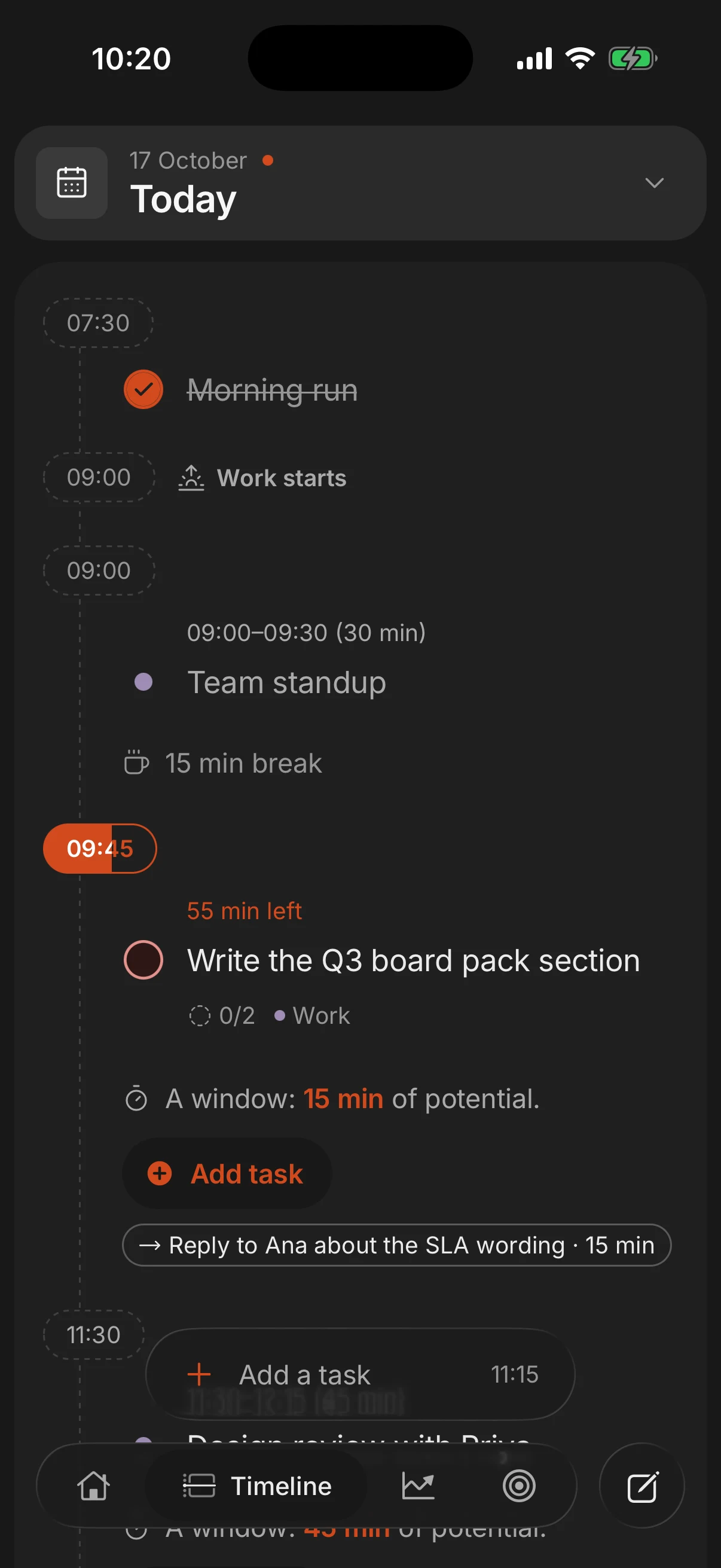
Superhive: the day in time blocks, tied to goals
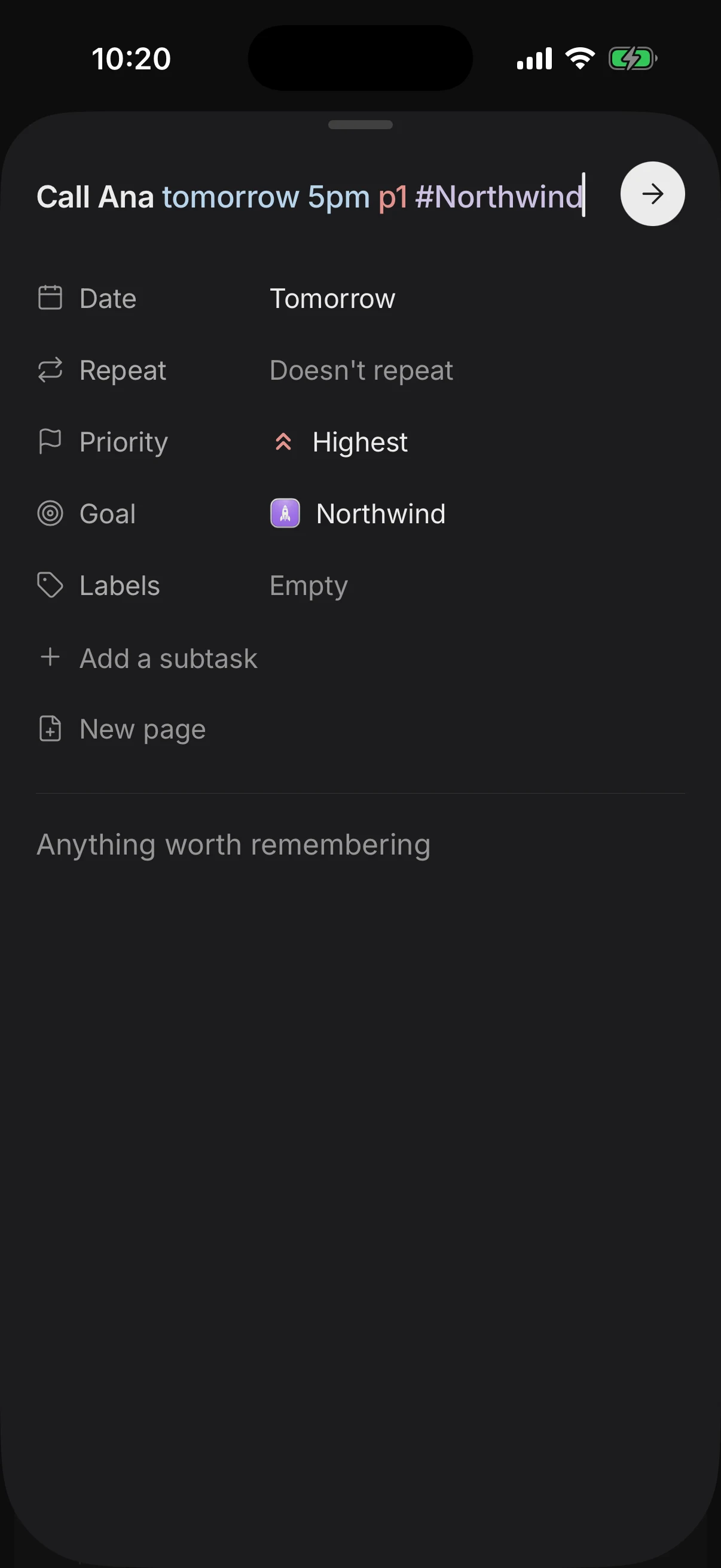
Superhive is the closest switch for people who like Todoist's quick add but want a plan for the day, not a longer list. Quick add reads the same kind of line, taking the date, time, priority (p1) and goal (#Goal) from the text, in English, Spanish and Portuguese. The difference is what happens next: tasks with a length land on the day as blocks in the free time around your events, each task can sit under a goal with milestones and a pace, and the daily shutdown closes the day by rolling what did not get done to tomorrow.
Know the trade-offs before you move. Superhive has far fewer integrations than Todoist, no desktop app (the web app runs in any browser and installs from Chrome), and shared goals rather than team project management. Recurring tasks, Google Calendar import and replan, which moves everything left undone to another day in one go, are part of Pro: $8.99 a year with a 3-day free trial, $2.99 a month or $24.99 once.
TickTick and Things 3
TickTick is the most direct replacement for Todoist: lists, smart dates and reminders, plus a calendar with day and week views, a habit tracker, an Eisenhower matrix and a Pomodoro timer in one app. It runs everywhere, and Premium costs about $50 a year, less than Todoist Pro. The trade-off is density: with everything on, it can feel crowded, and there is no goal layer above the lists. If you already use it, see TickTick alternatives.
Things 3 is the calmest of the four: a Today list, an Upcoming view with your calendar events, and projects with headings and deadlines, in a famously polished design. It is Apple only (iPhone, iPad, Mac, Apple Watch and Vision Pro) and sold once per platform, about $10 on iPhone, $20 on iPad and $50 on Mac, with sync included. There is no web app, no Android or Windows version, no sharing and no time blocking. If your life is on Apple devices and you work alone, that may not matter.
Who should pick what
- Stay with Todoist if you think in lists, rely on filters and labels, connect it to other tools, or share projects with a team. Nothing here beats it at that.
- Pick Superhive if you want to see whether the day fits before it starts, want daily tasks tied to goals, and plan mostly on your phone with the web app on the computer.
- Pick TickTick if you want tasks, habits, a focus timer and a calendar in one app, for less than Todoist Pro.
- Pick Things 3 if you only use Apple devices, work alone, and would rather pay once than subscribe.
Switch for a reason you can name. If the problem is that your list is too long, a new app will be just as full within a month. If the problem is that you never see your day, change the tool.
How to switch without losing anything
- Export first. On the web, open each project's three-dot menu and choose Import & export, then Export to CSV. The file leaves out completed tasks and the start date of recurring ones, so treat it as a backup, not a migration.
- Move only what is active: tasks due in the next two weeks, routines, and projects you touched last month. Retyping them is a chance to delete what no longer matters.
- List your recurring tasks before anything else. They break silently in a move: you only notice one is missing on the day it should have come back.
- Keep Todoist for two weeks, read only. If you open it to look something up, move that thing over.
- Plan every morning in the new app for a full week before judging it. Any new tool feels slow for the first few days.
Questions people ask
What is the best free alternative to Todoist?
For a list app, TickTick's free plan is the closest match. For planning the day in time blocks with goals, Superhive's free plan includes quick add, the day view and goals.
Is TickTick better than Todoist?
TickTick does more in one app, with a calendar, habits and a Pomodoro timer, and costs less. Todoist is simpler to look at, with stronger filters and far more integrations.
How much does Todoist Pro cost now?
In the US, $60 a year billed yearly or $7 a month billed monthly, since December 10, 2025. Subscribers through the App Store kept their earlier price.
Can Todoist do time blocking?
Partly. Pro lets you give tasks a duration and place them on a calendar layout, and Todoist connects to Google Calendar. It is still list-first, so the day as a timeline is not its main view.
Is there a Todoist alternative with goals?
Superhive lets you put each task under a goal with milestones and a pace, and shows your progress toward it. Todoist, TickTick and Things 3 organize tasks in projects or lists instead.
Keep reading
- TickTick alternative: Superhive vs TickTick, Todoist and StructuredLooking for a TickTick alternative? What TickTick does best, why people leave, and how Superhive, Todoist and Structured compare on goals, focus and price.
- The best daily planner apps in 2026, compared honestlySuperhive, Structured, Sunsama, Motion, Todoist, TickTick, Notion and Google Calendar compared: who each is for, what it does best, its catch and its price.
- Time blocking: how to plan your day in blocksTime blocking gives every task a start time and a length on your calendar. How to do it in 10 minutes a day, with an example day and the mistakes to avoid.
- How to break down goals into tasks you actually doBreak a goal into milestones, a weekly pace and one next task with a day and a time. A step-by-step method, a worked example and why most goals stall.